Manifest software for skydiving dropzones
The DZ-Manager desktop app is the manifest: every skydiver, every load, every aircraft on one screen. It works the way a manifest board works — you drag a skydiver onto a load.
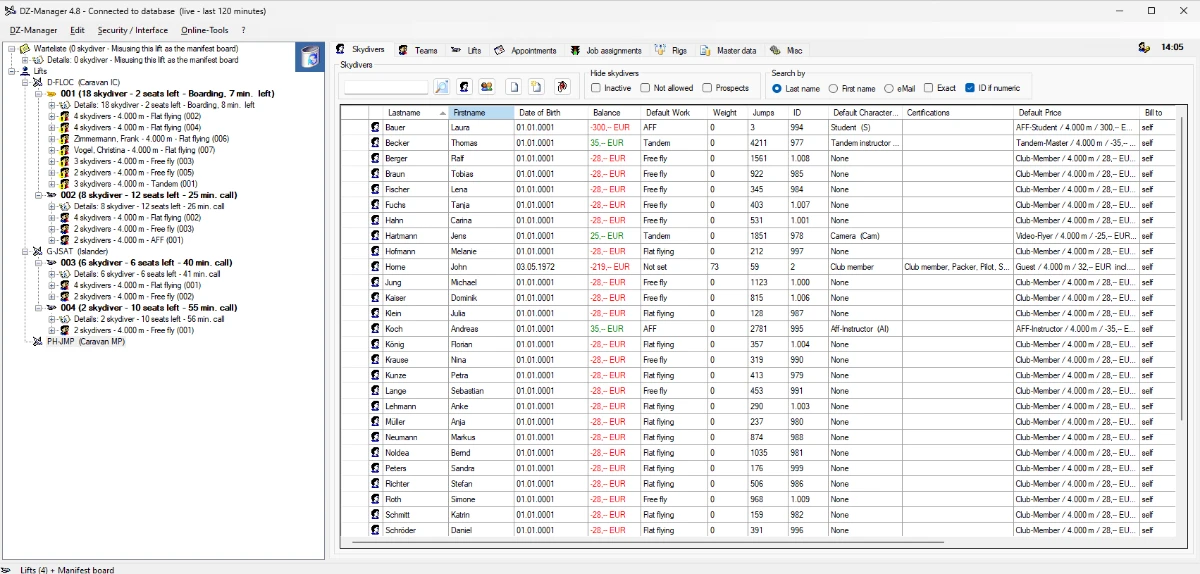
The manifest board
- Drag & drop: drop a skydiver on a group or a load and they are manifested.
- Over 100 status icons show at a glance who has paid, who is a student, which load is full and which is boarding.
- Teams stay together, even when they are on several loads at once.
- Several aircraft at the same time, each with its own loads and times.
- Scan a DzM-Card or a barcode instead of typing a name.
Hot Manifest: tandems and students in one dialog
Tandems, AFF students (Accelerated Free Fall) and 4-way students need an instructor, sometimes a camera flyer, and the right equipment. Hot Manifest puts all of that on the load in one dialog. The same dialog is in the Staff-Module, so it works in the browser too.
Bookings, appointments and gift cards
Tandem and course bookings from the Online-Tools arrive in the desktop app; staff can also enter bookings by phone. Turn appointments into gift cards, expire old ones in bulk, and send mails or text messages to everyone booked on a day. Third-party voucher codes (Groupon, Jochen Schweizer, mydays) are checked for duplicates and can be imported from Excel.
Accounts and payments
Every skydiver has an account. Prices, discounts and block tickets follow your own rules — by date, by weight, by what the skydiver is allowed to do. Book and settle many accounts at once, export SEPA direct debits, and take card payments at the counter with an EC-Cash terminal (Enterprise).
Reports
Overview, skydivers, jumps including students, loads and tandems — as ready-made reports, plus your own SQL queries for anything else.
Print and export with your own templates
Load lists, waivers, jump certificates, logbook pages, invoices, account statements, card layouts: DZ-Manager fills your templates — HTML, text, CSV, Word or Excel — with the data. Every printout looks the way you want it.
Word and Excel files are created without MS Office. Printing them without MS Office follows shortly: the desktop app then uses LibreOffice, so you need no Office license at the manifest.
- Templates can carry QR codes and barcodes for the skydiver, the booking, the appointment or the load.
- Remote printing: a booking or a payment in the Online-Tools can print the matching document on the PC at the dropzone — for example the waiver when a tandem passenger checks in.
- New and updated templates come with the regular updates; your own templates are never overwritten.
And more
- GDPR: consent field, anonymize a skydiver with one click, delete completely on request.
- Staff planning: who works which job today — and, with the Enterprise feature, in the weeks ahead.
- Rig management: maintenance dates of rigs and tandem rigs.
Start with the free Community Edition on one PC.