Load-Viewer and screens for the hangar
Skydivers want to know two things: which load am I on, and when does it go? The Load-Viewer answers both on every screen at the dropzone or on their own phone, so nobody has to ask the manifest.
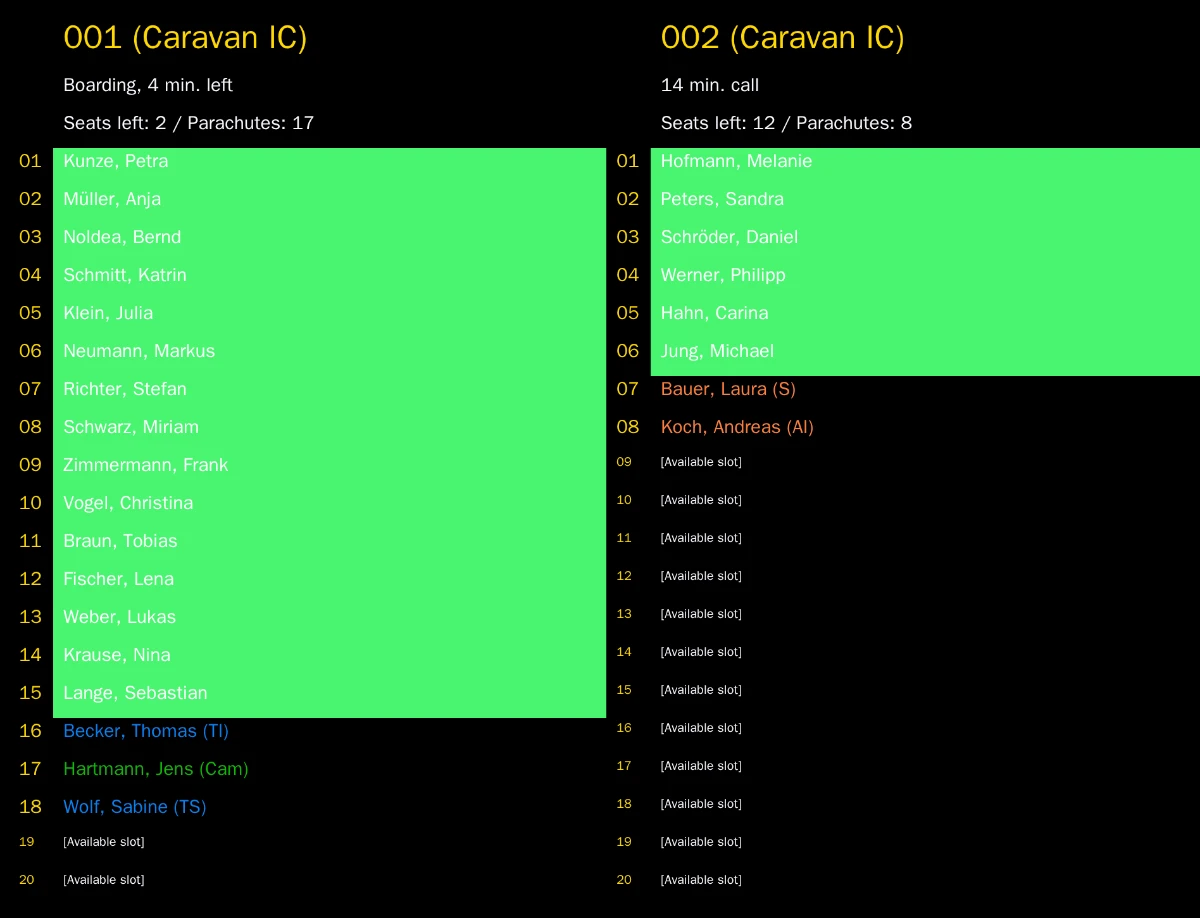
The Load-Viewer
- Fun jumpers plan for themselves before they come to the manifest — no more "is there space for us?".
- Skydivers and tandem passengers follow their load and its time — no more "which load am I on?".
- A clear overview with several aircraft; colors by aircraft or by what a skydiver does on the load.
- Filters and layout are set live, with a preview.
- Staff can manage jumps and loads directly on the screen.
On a big screen or on every phone
The Load-Viewer is part of the desktop app: one PC with a second monitor or TV is enough. The web Load-Viewer of the Online-Tools shows the same loads in any browser, on the hangar TV or on a skydiver's phone.
Free with ads
With third-party ads, the Load-Viewer license costs nothing. Without ads, it is a Load-Viewer license — cheaper than a full Professional license.
Web-Screens: signage for the hangar
Any screen with a browser becomes a display: it opens its address in full-screen mode and shows a rotating set of your templates — offers, notices, anything you design. You change the content centrally; running screens pick it up without a restart. Only screens you have paired can show your content. No extra license: run as many screens as you like, signage and payment screens alike.
Web-Screens: the payment screen
At the counter, a screen faces the customer and shows what they are about to pay — with a QR code. The customer scans it and pays on their own phone. Often cheaper than a card terminal from your bank: no terminal rent and no Enterprise edition needed, you only pay the fees of the online payment.